

A website editor needs access. Someone sends the owner password in a message. Later, an AI tool asks to connect the same account. Soon nobody can say who has access, which sessions remain active or how to recover the account if the owner loses a phone.
Good business password management is really access management. Strong sign-in matters, but so do ownership, recovery, permissions and removal. Connected AI tools make those last three questions harder to ignore.
Inventory the accounts that keep the business running
Begin with domain registration, business email, website hosting, website administration, banking, payment systems, advertising and customer records. Record the account owner, business purpose, administrators, recovery method and connected applications.
Do not put passwords in the inventory. Store them in an approved password manager with business controls. The inventory tells you where an account exists and who is responsible; the vault stores the secret.
Pay particular attention to the email account used for password resets. If it is compromised, an attacker may be able to recover other accounts. Check that former workers, old agencies and unused integrations no longer retain access.
Use unique passwords where passwords remain necessary
Generate a different long, random password for each service. Let the password manager remember it. Protect the manager itself with strong authentication and a tested recovery plan.
Current NIST guidance does not support arbitrary periodic password changes as a general rule. It calls for changes when compromise is indicated and rejects mandatory character-mixture rules as a substitute for sound password controls. Its guidance is written for authentication systems, not a promise that every service implements it. NIST SP 800-63B-4
For your business, the practical priorities are uniqueness, length, safe storage and prompt action after suspected exposure. Do not copy an example password from an article. Do not paste a real password into a website that offers to rate its strength.
Prefer phishing-resistant sign-in when available
Passkeys and security-key sign-in can reduce exposure to password phishing when correctly supported and configured. The important distinction is whether authentication is bound to the legitimate service, rather than asking a person to type a reusable secret or code into whichever page appears.
NIST distinguishes phishing-resistant authentication from manually entered one-time codes. That does not make all other multi-factor authentication useless; it means the methods protect against different threats. NIST SP 800-63B-4
For each critical account, check supported options and recovery requirements. Register an appropriate backup method. Test access before removing an old method, and keep recovery information somewhere an authorized owner can retrieve during an outage or lost-device incident.
Give each person the access they need
Use named accounts instead of shared owner logins wherever the platform supports them. A content editor rarely needs the ability to change billing or add administrators. WordPress, for example, separates capabilities through roles. WordPress: Roles and capabilities
Set an end date for temporary access and record why it was granted. When work ends, remove the account or permissions, revoke active sessions where appropriate and review connected applications. Changing a shared password alone may leave other access paths open.
Keep an emergency process, but do not make emergency access the everyday workflow. Someone should be able to explain who can recover the account if the usual administrator is unavailable.
Treat AI connections as new access grants
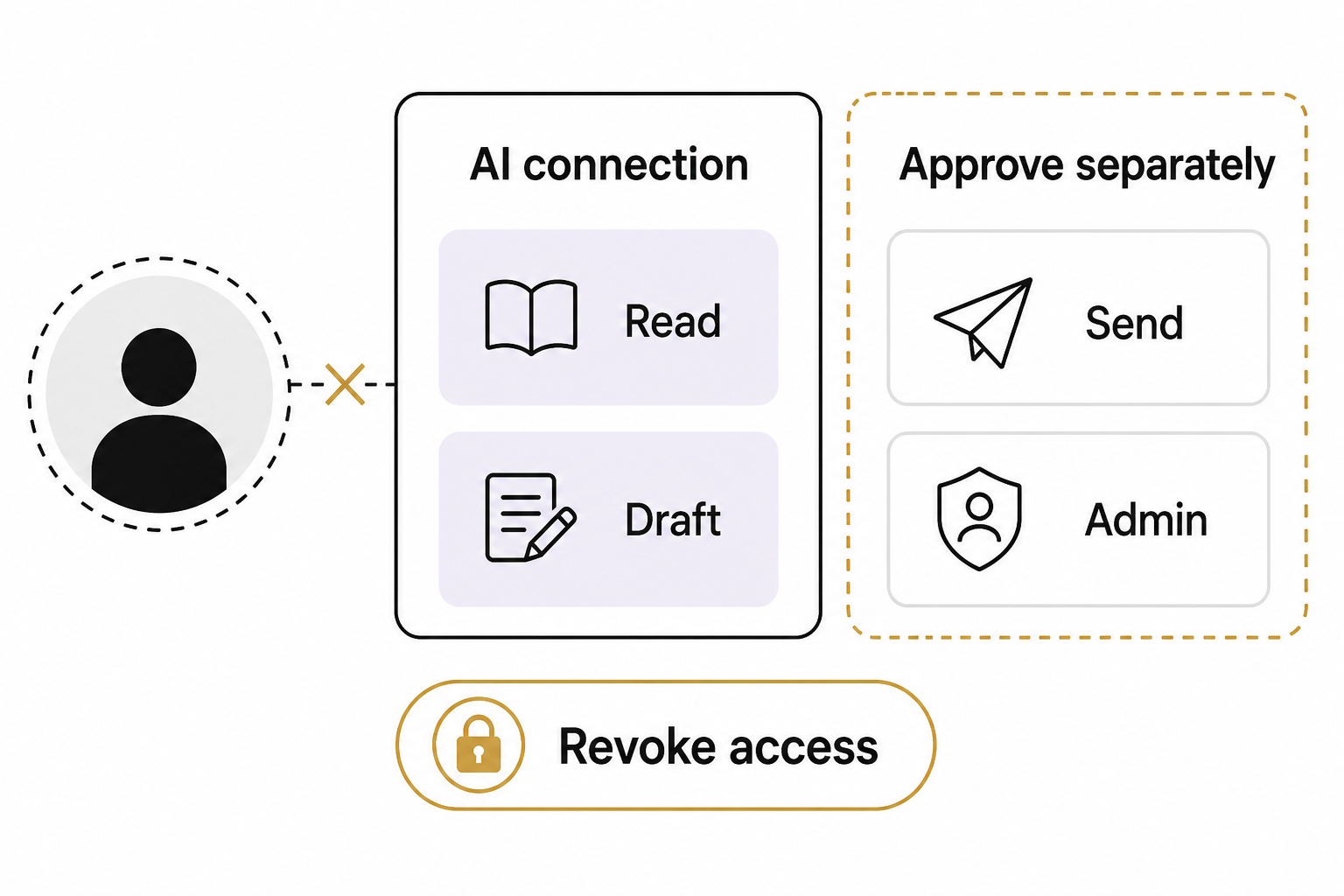
An assistant that can read customer records or edit your website is an additional actor with authority. Review the exact permissions requested before connecting it. Start with read access where that meets the task, and avoid granting administration merely because it is convenient.
Keep API keys, recovery codes and private tokens out of prompts, screenshots, shared documents and source code. Use the platform’s supported secret storage. If a secret is exposed, revoke or rotate it through the provider and investigate its use; asking the model to forget it is not a remedy.
Define which actions require review: publishing, deleting, sending messages, changing access and spending money are obvious candidates. Read a permission screen as a business decision, not as a setup obstacle.
A hypothetical example
A shop wants an assistant to draft product descriptions. It does not need the owner login or payment access. The safer design provides approved product information, creates drafts and leaves publication with an authorized person. If the tool later requests broader permissions, that is a new decision.
Practice recovery before you need it
Choose one important account and verify the documented recovery process without locking anyone out. Confirm that backup devices and recovery contacts still work. Record the date of the check.
Review the inventory when roles, devices or tools change. A manageable security process is one people can repeat, not a policy they read once and abandon. If your website and marketing accounts need an ownership review, discuss the scope on an Eastmoor Digital discovery call.
Sources & further reading
Primary references checked for this refresh. Availability and platform behavior may change.
- NIST SP 800-63B-4Checked 2026-08-31
- WordPress: Roles and capabilitiesChecked 2026-08-31