

A new lead notification feels like progress. Then the details arrive: the person needs a service you do not provide, lives outside your area or never expected a sales call. More notifications will not solve that problem.
Generating leads online means helping a suitable person take a useful next step and making sure the business responds. AI can assist with creative, intake summaries and routing. The system still needs clear definitions and a person accountable for what happens next.
Define a useful lead before choosing a channel
Write down the conditions that make an inquiry relevant. Consider the requested service, location, timing and ability to proceed. Keep the definition connected to real business needs rather than demographic guesses.
Distinguish a subscriber from an inquiry, an inquiry from a qualified opportunity and an opportunity from a customer. Someone downloading a checklist may be researching for the future. Treating that download as permission for persistent sales contact can damage the relationship before it starts.
Record disqualification reasons consistently. They reveal whether the ad, offer or form is attracting the wrong expectations.
Match the offer to the stage of the decision
A visitor learning the basics may need a guide. Someone comparing providers may need a process explanation or relevant examples. A person ready to act needs a straightforward way to ask about availability or suitability.
For a hypothetical office-furniture supplier, a workspace planning checklist could support early research. A project inquiry would collect different information and explain the assessment process. Both can be useful without pretending that every download is a sales-ready opportunity.
Choose an offer you can actually deliver. AI may suggest a webinar, calculator or consultation, but those ideas need a working service behind them.
Build a landing page that sets expectations
Explain who the offer is for, what the person receives and what happens after they submit. Ask only for information that supports that next step. Include a relevant privacy explanation and any required channel-specific permission.
Use a real mobile device to complete the form. Check validation, confirmation, notifications and the CRM record. A form that looks right but routes nowhere is a broken acquisition system.
Make accessibility part of the test: visible labels, understandable errors, keyboard operation and readable text. Do not require a visitor to decode a design effect to contact you.
Choose a channel based on the buyer’s behavior
Search can support active demand. Useful content can answer questions before an inquiry. Social channels can introduce a problem or demonstrate an approach. Email can continue a conversation with people who requested it.
Native lead forms can reduce the steps required to inquire, but convenience alone does not establish intent. LinkedIn’s product updates describe AI-assisted Accelerate campaigns and lead-generation formats. Use those capabilities only after defining what a good outcome means.
Start with a manageable channel and offer combination. If several channels launch simultaneously without consistent tracking, diagnosing quality problems becomes harder.
Give AI a bounded role in intake
AI can summarize what a person requested, suggest a category and draft a response using approved information. Have it show the original inquiry alongside its summary. A mistaken classification should be easy to correct.
Do not let an intake assistant invent service availability, diagnose a sensitive problem or make a binding commitment. Route uncertain cases for review. Keep an accessible alternative when an automated conversation fails.
Review data permissions before sending inquiries to an external model. Remove unnecessary personal details and define retention. The ability to connect a CRM does not mean every field should enter every tool.
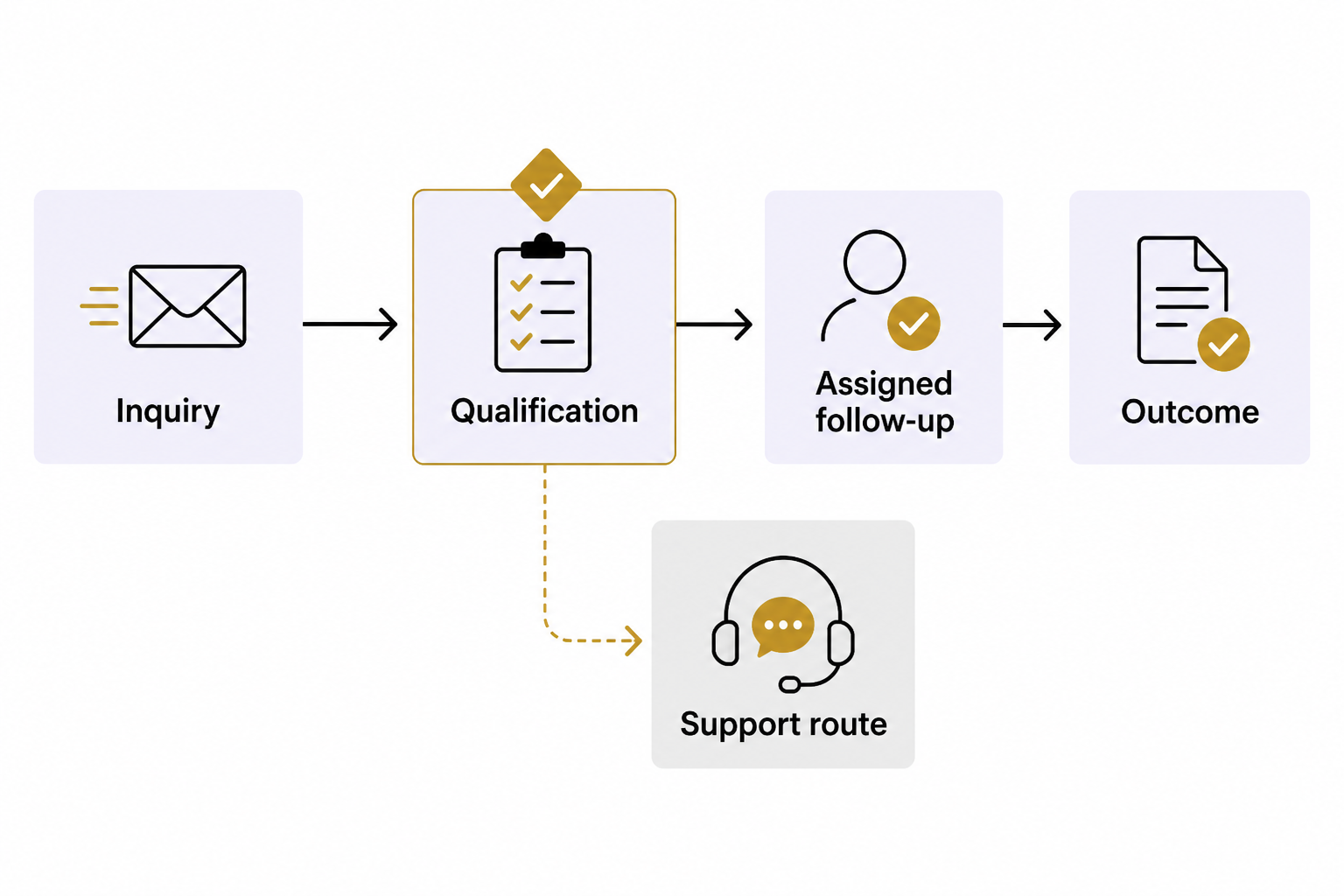
Make follow-up relevant and dependable
Assign an owner and next action to each suitable inquiry. Confirm receipt without promising an unapproved response time. Reference the actual request when replying, and stop sequences when the person responds, opts out or is no longer a fit.
AI email tools can create drafts from approved source materials. Use that help to explain the next step clearly, not to send more messages simply because production is easy. Verify links and factual details before activation.
Test duplicate submissions and missing information too. Those cases are normal operational conditions, not rare exceptions to ignore.
Measure the whole path
Track source, submitted inquiries, qualified opportunities, attended appointments and customers. Include campaign cost and the time required to handle responses. Agree on definitions and date ranges before comparing channels.
A cheap form submission can be expensive if it consumes follow-up time without a realistic opportunity. Review lost reasons and customer fit alongside cost per lead. AI summaries can help surface patterns, but inspect the records behind them and avoid treating correlation as proof of causation.
For help connecting acquisition with a working sales process, schedule an Eastmoor Digital discovery call.
Sources & further reading
Primary references checked for this refresh. Availability and platform behavior may change.
- LinkedIn Marketing Solutions product updatesChecked 2026-08-31
- Mailchimp: Create email content with AIChecked 2026-08-31